The perfect seating chart in under 15 minutes
Drag tables, assign guests visually, and export a professional PDF. Forget paper, sticky notes, and hand-drawn layouts.
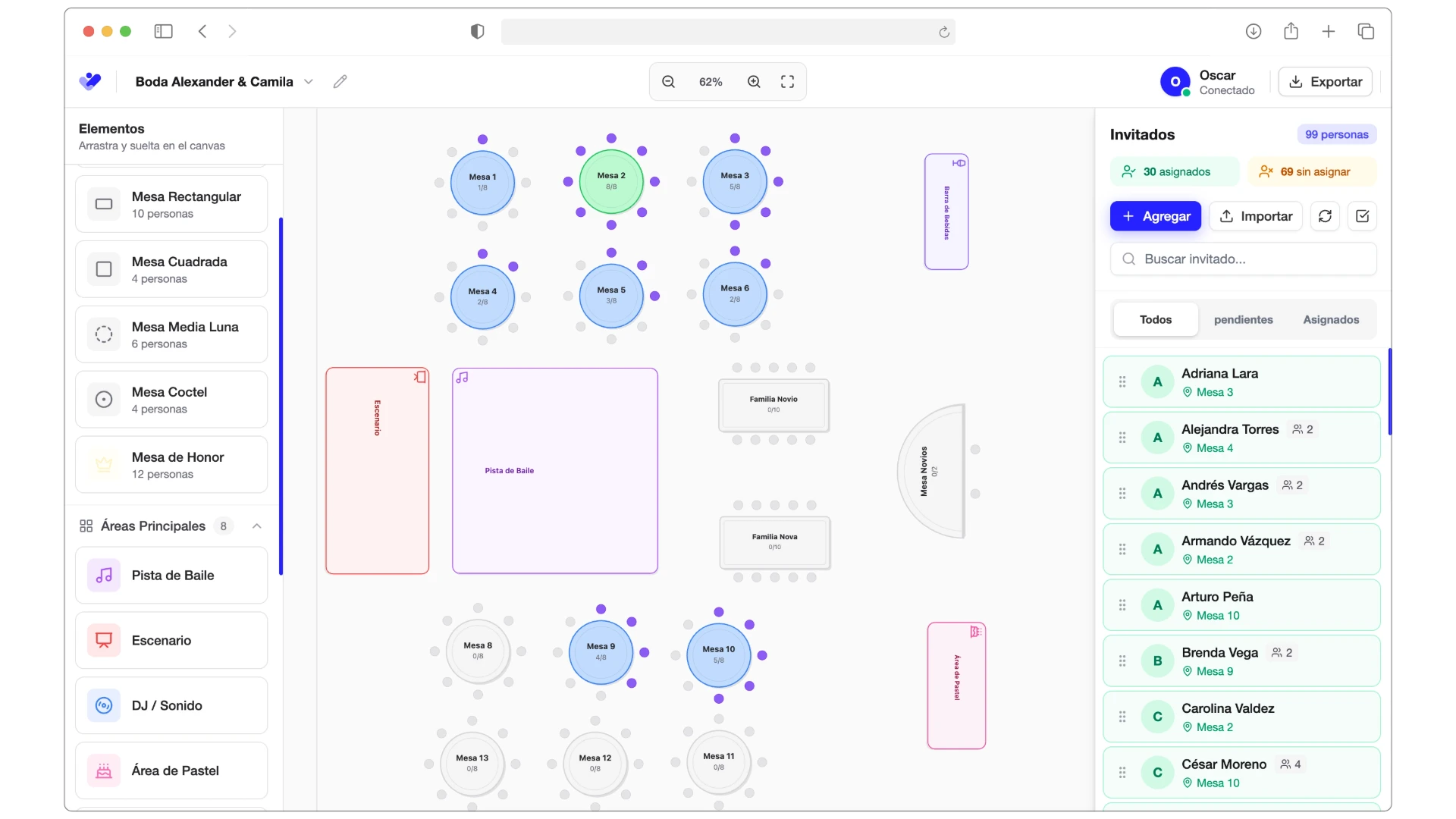
Designing your layout has never been this easy
Everything you need to create the perfect layout, hassle-free
Get started for free in seconds
No sign-up, no limits. Save in your browser and export whenever you want.
Connect for more power
Sign in to save to the cloud, sync with Confirmalia, and access from any device.
Multiple projects
Manage up to 5 different events. Each with its own design and guest list.
Infinite canvas with zoom
Design without limits. Zoom in, zoom out, and navigate your space freely. Magnetic grid for perfect alignment.
15+ element types
Round, rectangular, imperial tables, plus dance floor, bar, stage, buffet, and everything you need.
Visual assignment
Drag guests to tables and see each seat status in real time. Green = confirmed, Purple = pending.
Instant statistics
Full control: capacity vs occupancy, full tables, unassigned guests. Everything updated instantly.
Professional export
Multi-page PDF with cover, high-resolution layout, and detailed table-by-table list. Ready to print.
RSVP synchronization
If you use Confirmalia, import guests automatically and see their confirmations updated in real time.
All the elements you need
Over 25 elements to design the perfect space
Tables
Spaces
Structure
Services
Customize every element
- Adjust size, rotation, and position with precision
- Change table names and capacity
- Duplicate elements to create layouts faster
- Magnetic grid for perfect alignment
Create your layout in 3 steps
As easy as drag and drop. You don't need to be a designer.
Design your space
Drag tables onto the canvas and adjust their size, rotation, and position. Add decorative elements like dance floor, bar, or stage.
Assign guests
Create your guest list or import it from a file. Drag each person to their table and see occupancy in real time.
Export and share
Download your layout as a high-quality PDF or PNG. Includes the detailed list of each table with its guests.
Customize every detail
- Adjust position (X, Y), rotation, and dimensions (width/height)
- Edit table name and seating capacity
- Duplicate elements with one click to save time
- Magnetic grid for perfect alignment
Perfect for any event
Whether it's an intimate wedding or a 200-person corporate event, the Seating Planner adapts to you.
Large weddings
Organize 100+ guests across multiple tables. See which families sit together and avoid conflicts.
Corporate events
Strategically mix teams and departments. Export to share with the venue.
Family gatherings
Group generations and make sure everyone has a seat. Perfect for quinceañeras.
Say goodbye to paper, sticky notes, and hand-drawn layouts
Compare and see why thousands of organizers choose our Seating Planner
| Feature | Seating Planner | Paper/Sticky Notes | Canva/Illustrator |
|---|---|---|---|
| Pre-built event elements | ✕ | Limited | |
| Built-in guest assignment | Manual | ✕ | |
| Automatic capacity control | Count by hand | ✕ | |
| Visual RSVP statuses | ✕ | ✕ | |
| Last-minute changes without redoing | Erase/rewrite | Redesign | |
| Automatic guest list per table | Copy by hand | ✕ | |
| Sync with confirmations | ✕ | ✕ |
Stop spending hours drawing and erasing. Design your layout in minutes.
Try the Seating Planner for freeUse it free or connect it with Confirmalia
Start without signing up and save in your browser. Or connect your account for cloud sync and real-time RSVP.
Guest Mode
No sign-up, 100% free
Get started in seconds
No forms or emails
Save in your browser
Up to 5 different projects
All features included
Canvas, tables, PDF export
No time limits
Use it as long as you want
💡 Perfect for: Small events or if you prefer not to sign up
Connected Mode
With a Confirmalia account
Save to the cloud
Access from any device
Import guests automatically
From your Confirmalia events
Real-time RSVP statuses
See who confirmed live
Automatic backup
Never lose your work
Multiple project management
Organize several different events
🚀 Recommended for: Wedding planners, large events, or multiple events
Discover ConfirmaliaReal-time synchronization
When someone confirms on Confirmalia, the change is instantly reflected in the layout
 Confirmalia Live
 Ana Martínez
Status: Confirmed
Frequently asked questions
Everything you need to know about the Seating Planner
Is it really free?
Yes, 100% free. You can create all the layouts you want, export them to PDF, and there are no time limits. We don't ask for a credit card or payment information.
Do I need to install anything?
No, the Seating Planner runs entirely in your browser. Just open the page and start designing. Compatible with Chrome, Firefox, Safari, and Edge.
How are my designs saved?
In guest mode, your designs are automatically saved in your browser (localStorage). If you sign in with Confirmalia, they are saved to the cloud and you can access them from any device.
Can I import my guest list?
Yes, you can import from text/CSV or, if you use Confirmalia, directly import all your guests with their confirmation statuses with a single click.
What quality are the exports?
You can export in high resolution (up to 300 DPI) in PDF or PNG format. The PDF includes a cover with the full layout and additional pages with the detailed list of each table.
Does it work on phones or tablets?
The Seating Planner is optimized for desktop/laptop due to the complexity of the canvas and drag & drop. We recommend using it on a computer for the best experience.
How many projects can I create?
You can have up to 5 saved projects. If you sign in with Confirmalia, your projects are saved to the cloud and you can access them from any device.
Ready to design your perfect layout?
Join thousands of organizers who already created their layouts visually, quickly, and professionally.